 PriceGate
Is it a good price on Amazon.ae? How to check before you buy
The discount badge does not tell you if today is a good price. The product's own price history does. Here is a five step check that takes under a minute.

Why the price on the page is not enough
An Amazon.ae product page shows you three things that look like price information: today's price, a strikethrough "was" or "List Price", and sometimes a percent off badge. Only the first one is a fact about today. The strikethrough is a reference price, and it does not tell you what the product actually sold for over the last weeks. A product can show "25% off" every day for months, and a product with no badge at all can be at its lowest price ever.
So the useful question is not "how big is the discount?" It is "how does today's price compare with what this exact product has really cost recently?" That needs a price history.
Step 1: look at the history, not the badge
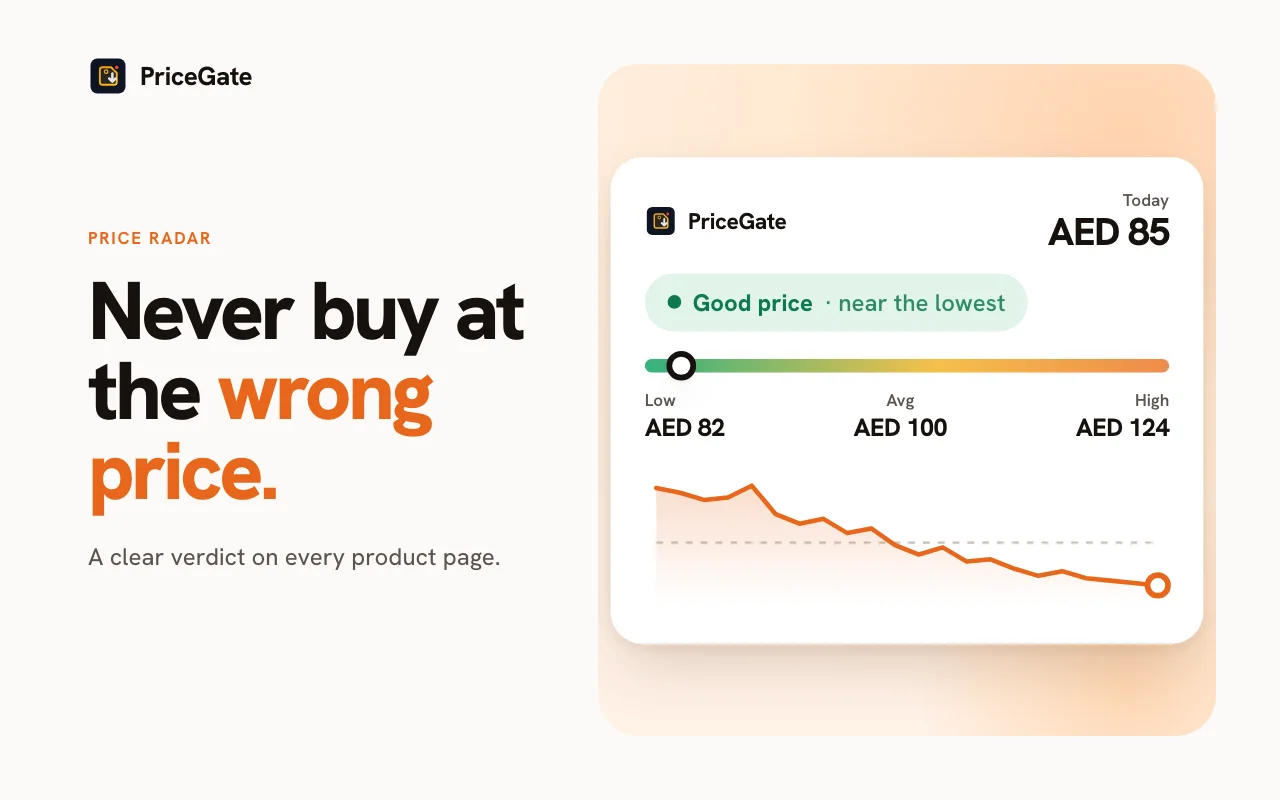
Open the product with PriceGate installed. The panel next to the price shows a chart of the price over time in AED, plus the lowest, average and highest price it has recorded. Read it in this order:
- Today against the average. If today is clearly below the average, the price is genuinely low for this product. If it sits on the average, it is a normal day, whatever the badge says.
- Today against the lowest. If the lowest price is much lower than today, the product has been cheaper before and may be again. If today matches the lowest, that is about as good as it has been.
- The shape of the line. A flat line with short dips means the product goes on sale in bursts, so waiting for the next dip is realistic. A line that steps down over time usually means the product is getting older and the price is drifting lower on its own.
PriceGate sums this up as a verdict, Good price or Maybe wait, but the chart is there so you can make the call yourself.
Step 2: compare the same thing
Price comparisons go wrong when two listings are not the same product. Before you decide, check:
- Variant. Storage size, colour and bundle often have separate prices. A phone in one colour can be noticeably cheaper than the same phone in another.
- Seller. "Sold by Amazon" and a third party seller can differ on price, warranty and returns. A cheap offer from a seller with few ratings is not the same deal.
- Region and warranty. Some electronics are sold as international versions. Check the listing for a UAE or GCC warranty if that matters to you.
- Coupons. A "clip coupon" checkbox lowers the price at checkout but not always the number on the page. Add it to your mental math.
Step 3: check the total, not just the item
For most Prime members delivery inside the UAE is free, but not every item qualifies, and some sellers ship from abroad. Look at the checkout total. A slightly higher price with free next day delivery and an easy return can be the better buy.
Step 4: decide, or set an alert
If the history says today is good and you need the item, buy it. If the history says "maybe wait", you do not have to keep checking by hand. In the PriceGate panel set a target price or a percent drop. You can tap the lowest, average, 30 day or median price to use it as the target. PriceGate keeps checking and sends a browser notification when the price gets there.
Tip: if you want a specific product within the next few months, set the target near the recent lowest price, not the all time lowest. Recent lows tend to come back during sale events, while an all time low from a one off clearance may not.
Step 5: watch the price after you buy
Amazon.ae has a return window on most items. PriceGate can read your Amazon orders inside your browser (nothing is uploaded), mark what you paid on the chart, and tell you if the price dropped while you can still return it. Then you can decide whether a return and rebuy is worth the effort.
A note on new products: PriceGate builds a shared, anonymous history from the products its users view and track. A popular product has a long chart. A product nobody has tracked yet starts with a short one, so set an alert and let the history build.
Quick checklist
- Ignore the strikethrough, read the chart.
- Is today below the average? Close to the lowest?
- Same variant, same seller type, right warranty?
- Any coupon, and what is the checkout total?
- If not good yet, set a target price and wait for the alert.
Shopping during a sale event? Read our guide to spotting fake White Friday discounts, or plan ahead with the best time to buy electronics.
Related guides



Or start from the Amazon.ae price tracker page, or read about Amazon price history in the UAE.
Common questions
How do I know if an Amazon.ae price is good?
Compare today's price with the product's own price history, not with the strikethrough price. If today is below the average and close to the recent lowest price, it is a good price for that product. PriceGate shows this history in AED next to the price.
Is the strikethrough "was" price on Amazon.ae reliable?
It is a reference price and does not show what the product actually sold for recently. Use a price history to see the real prices over time.
What target price should I set for an alert?
A practical target is near the product's recent lowest price. In PriceGate you can tap the lowest, average, 30 day or median price to use it as the target.
What if a product has no price history yet?
Set a price alert anyway. PriceGate starts building the history once someone tracks the product, and it notifies you when your target is reached.
Check your next Amazon.ae price
Install PriceGate, open the product you are watching, and see its price history in AED before you pay.